Posts

Exercise 6: Changing Button Properties

Image
  Output for the Code HTML: <!DOCTYPE html> <html> <head> <meta name="viewport" content="width=device-width, initial-scale=1"> <title>Change button Exercise</title> <link rel="stylesheet" href="ButtonProperties.css"> </head> <body> <fieldset> <h1> Change Button Properties </h1> <h3> Enter Color: </h3> <input type="text" id="input1"/> <br> <h3> Enter number: </h3> <input type="number" id="input2" onchange="onchangeevent()"/> <br> <br> <br> <input class="btn" type="button" id="display1"> <input class="btn" type="button" id="display2"> <input class="btn" type="button" id="display3"> <input class="btn" type="button" id="display4">...

Exercise 7: Painting in Canvas

Image
  (image wont load) <!DOCTYPE html> <html> <head> <meta name="viewport" content="width=device-width, initial-scale=1"> <title>Exercise 010 Drawing in Canvas</title> </head> <body> <canvas id="myCanvas" width="1345.5" height="603.5" style="border:1px solid #000000;"> </canvas> <script> var canvas = document.getElementById("myCanvas"); var ctx = canvas.getContext("2d"); ctx.globalAlpha = 0.8 ctx.fillStyle = "#b94301"; ctx.fillRect(500,110,283,353); ctx.fillStyle = "#b94301"; ctx.fillRect(520,128,230,300); ctx.fillStyle = "#ffe79c"; ctx.beginPath(); ctx.arc(580,220,50,0,2*Math.PI); ctx.fill(); ctx.fillStyle = "#ffe79c"; ctx.beginPath(); ctx.arc(580,180,40,0,2*Math.PI); ctx.fill(); ctx.fillStyle = "#ffe79c"; ctx.beginPath(); c...

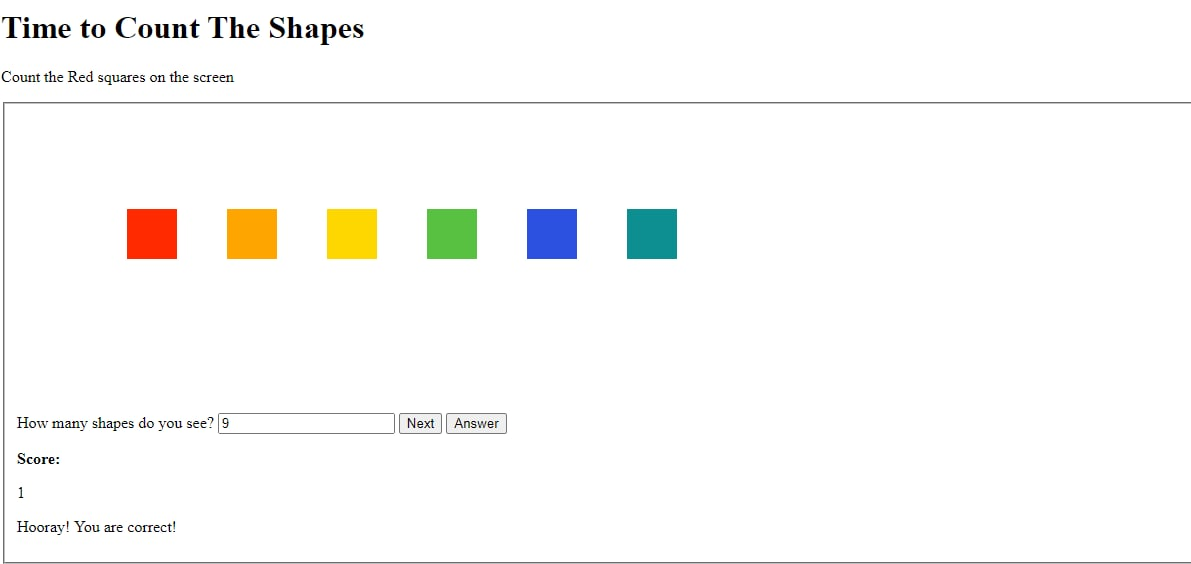
Exercise 8: Counting Boxes

Image
  <!DOCTYPE html> <html> <head> Big Head Count  </head> <body> <h1>Time to Count The Shapes</h1> <p> Count the Red squares on the screen </p> <fieldset>     <canvas id="myCanvas" width="1200" height="300" style="border:none;">     </canvas>     <label> How many shapes do you see? </label>     <input type="number" id="answer"> </input>     <!-- <button id="colors" onclick="colors()" > Colors </button> -->     <button id="eraser" onclick="eraser()" > Next </button>     <button id="compare" onclick="compare();eraser()" > Answer </button>     <p> <b>    Score: </b> </p> <div id="myScore"> 0 </div>     <p id="demo"> </p> </fieldset> </body> <script type = ...

Exercise 5: Price List

Image
  The Code: <!DOCTYPE html>      <html>      <head>      <meta name="viewport" content="width=device-width, initial-scale=1">      <title>Price List, Add and Remove</title>      <link rel="stylesheet" href="Exercise 007 - Style code.css">      </head>          <body>      <h1 class="font1"> Products & Price Select box</h1>      <div id="container">      <form>      <fieldset>      <label for="name"> • Add Products: </label>      <input type="text" id="name" placeholder="Enter Product" autocomplete="off"> <br> <br>      <label for="price"> • Add Price: </label>      <input type="number" id="price" placeholder="Enter Price...

Exercise 4: Order List

Image
  Owen Wilson go WOW source: <!DOCTYPE html> <html> <head> <style> h1 { margin-left: 280px; font-family: "Arial"; } h4 { margin-left: 285px; font-family: "Arial"; } p { margin-left:40px; } label { display: inline-block; width: 150px; height: 20px; padding: 10px; margin-left: 30px; font-family: "Arial"; } fieldset { margin-left: 280px; margin-right: 280px; background: #909090; padding: 5px; font-family: "Times New Roman"; } #demo { position: relative; margin-left: 280px; margin-right: 280px; } #runthis { margin-left: 205px; margin-top:25px; } </style> </head> <body> <h1> Order List </h1> <h4> Please enter your details </h4> <fieldset> <label for="name">Enter your Name: </label> <input type="text" placeholder="Enter name" onfocus="this.placeholder=''" name="Name" id="name" value="" requ...

Exercise 3: If Else Months

  (screenshot wont publish smh) <html>  <head>What's the month?</head>   <body>Enter number of month:<br>     <input id="text_a" type="text;"> <p id="answer"></p> <button onclick="getFunction()">Submit</button> <script> function getFunction() { var a=document.getElementById("text_a").value; if (a=="1")   { document.getElementById("answer").innerHTML="1 January, New Year, New Beginnings ";   } else if (a=="2")   { document.getElementById("answer").innerHTML="2 February, Valentine's Day";   } else if (a=="3")   { document.getElementById("answer").innerHTML="3 March, Marchonward";   } else if (a=="4")   { document.getElementById("answer").innerHTML="4 April, Easter";   } else if (a=="5")   { document.getElementById("answer...

Exercise 2: Grade Equivalent

Image
  <!DOCTYPE html> <html> <head> <title>Grade Equivalent</title> </head> <body> <h1>Grade Equivalent</h1> <p> <b> Name: </b> <input type="text" id="myText" name="fname" value=""></p> <p> <b> Score: </b> <input type="text" placeholder="Type" id="inputId2" value=""></p> <p><b>Total Items:</b><input type="text" placeholder="Type" id="inputId3" value=""></p> <button type="button"onclick="getCompute();">Compute</button> <script> function getCompute(){ var str = document.getElementById("myText").value; var n1 = Number(document.getElementById("inputId2").value); var n2 = Number(document.getElementById("inputId3").value); ave = (n1/n2)*...

Exercise 1: The First Javascript Program

Image
  <html> <head><title>Javascript Code </head></title> <body> <script language = "javascript" type = "text/javascript">   var name,age,course,skill,subject ; document.write("<br> Welcome to Javascript Programming"); name=prompt("Your Name Here"); document.write("<br> Name: <b>" +name) ; age=prompt("Age"); document.write("<br> Age: <b>" +age ); course=prompt("Enter your course"); document.write("<br> Course: <b>" +course ); skill=prompt("Enter your talent/skills"); document.write("<br> Talent: <b>" +skill ); subject=prompt("What's your favourite subject?"); document.write("<br> Subject: <b>" +subject ); </script> </body> </html> Output

Sign Up Form Output

Image
  autofill

Compilation of Finals Part 2

  Animation <!DOCTYPE html> <html> <head> Animation   <style>  div {   width: 2000px;   height: 100px;   background-color: pink;   animation-name: example;   animation-duration: 10s; } @keyframes example {   from {background-color: red;}   to {background-color: blue;} } To make the animation transition, they keyframes are key, cuz they're named Keyframes. there you see From and To, which are self explanatory, so you use Keyframes to indicate what is the start and end of an animation with HTML. Embedding a Youtube Video with IFrames <iframe width="1080" height="720" src="https://www.youtube.com/embed/29ZBBsq6uSU"> </iframe> Is all you need, you can insert this in the body of an HTML you are working on, change the link and it will play the video in the HTML, all you need is internet.

Compilation of Finals Part 1

Image
  Drawing on a Canvas To make your HTML Code act like a canvas you must first use  <canvas id="MyCanvas" width="1080" Height="720"  style="border:1px solid #4f1802 ;"> To Establish a canvas, i chose the standard 1080, 720px resolution. once the canvas has been established, you can now draw on it. var canvas = document.getElementById("MyCanvas"); var ctx = canvas.getContext("2d"); ctx.globalAlpha = 1 Is also the ID if your canvas, to make it identify as a Canvas.          ctx.fillStyle = "#a6471e"; ctx.fillRect(500,110,280,350); ctx.fillStyle = "#fac087"; ctx.fillRect(480,100,230,300); ctx.fillStyle = "#17fc03"; ctx.fillRect(500,50,300,50); Each one acts as a layer, the one on top is the top layer so it will cover everything underneath it. Counting Drill To establish the UI or Fieldset first you need to do   <canvas id="myCanvas" width="1200" height=...

Video Tutorial

 https://youtu.be/vcgKHzh0z2U pls give me views

Chat Box

Image
  the output

Canvas Drawing HTML

 <html> <head> <meta name="viewport" content="width=device-width, initial-scale=1"> <title>Exercise Drawing on A Canvas </title> </head> <body> <canvas id="MyCanvas" width="1080" Height="720"  style="border:1px solid #4f1802 ;"> Molina </canvas> <script> var canvas = document.getElementById("MyCanvas"); var ctx = canvas.getContext("2d"); ctx.globalAlpha = 1 ctx.fillStyle = "#a6471e"; ctx.fillRect(500,110,280,350); ctx.fillStyle = "#fac087"; ctx.fillRect(480,100,230,300); ctx.fillStyle = "#17fc03"; ctx.fillRect(500,50,300,50); </script>

Adding A Youtube Link Embed

 <!DOCTYPE html> <html> <head> Animation   <style>  div {   width: 2000px;   height: 100px;   background-color: pink;   animation-name: example;   animation-duration: 10s; } @keyframes example {   from {background-color: red;}   to {background-color: blue;} } </style> </head> <body> <div><h1><center> Welcome!</center></h1></div> Cryptocurrencies such as ether and dogecoin have surged to highs that few investors would have predicted a year ago. The furious run has even the most optimistic traders asking: Can it last? The forces underpinning the crypto mania mirror those that saw GameStop Corp. shares tear higher earlier this year. Excess money from stimulus checks aimed at helping the most vulnerable make rent has also found its way to brokerage accounts that offer free trading. Meanwhile, people globally have spent more time at home and in front of screens...

Exercise 10 Counting Red Squares

  Video Output <!DOCTYPE html> <html> <head> Big Head Count  </head> <body> <h1>Time to Count The Shapes</h1> <p> Count the Red squares on the screen </p> <fieldset>     <canvas id="myCanvas" width="1200" height="300" style="border:none;">     </canvas>     <label> How many shapes do you see? </label>     <input type="number" id="answer"> </input>     <!-- <button id="colors" onclick="colors()" > Colors </button> -->     <button id="eraser" onclick="eraser()" > Next </button>     <button id="compare" onclick="compare();eraser()" > Answer </button>     <p> <b>    Score: </b> </p> <div id="myScore"> 0 </div>     <p id="demo"> </p> </fieldset> </body> <s...

Animation Transition Activity

<!DOCTYPE html> <html> <head> Animation   <style>  div {   width: 2000px;   height: 100px;   background-color: pink;   animation-name: example;   animation-duration: 10s; } } </style> </head> <body> <div><h1><center> Welcome!</center></h1></div> Cryptocurrencies such as ether and dogecoin have surged to highs that few investors would have predicted a year ago. The furious run has even the most optimistic traders asking: Can it last? The forces underpinning the crypto mania mirror those that saw GameStop Corp. shares tear higher earlier this year. Excess money from stimulus checks aimed at helping the most vulnerable make rent has also found its way to brokerage accounts that offer free trading. Meanwhile, people globally have spent more time at home and in front of screens as the pandemic shut businesses.Cryptocurrencies such as ether and dogecoin have surged to highs th...